 Snowplow Estimator
Monthly
$5 a month
Monthly, billed by Gumroad. Cancel any time from your Gumroad account. Includes the sheet, the setup guide, the tutorial video, updates, and email support while your membership is active.
Monthly — $5 a monthSnowplow Estimator
Built by a snow contractor plowing in Clinton, Ohio since 1990. $5 a month.
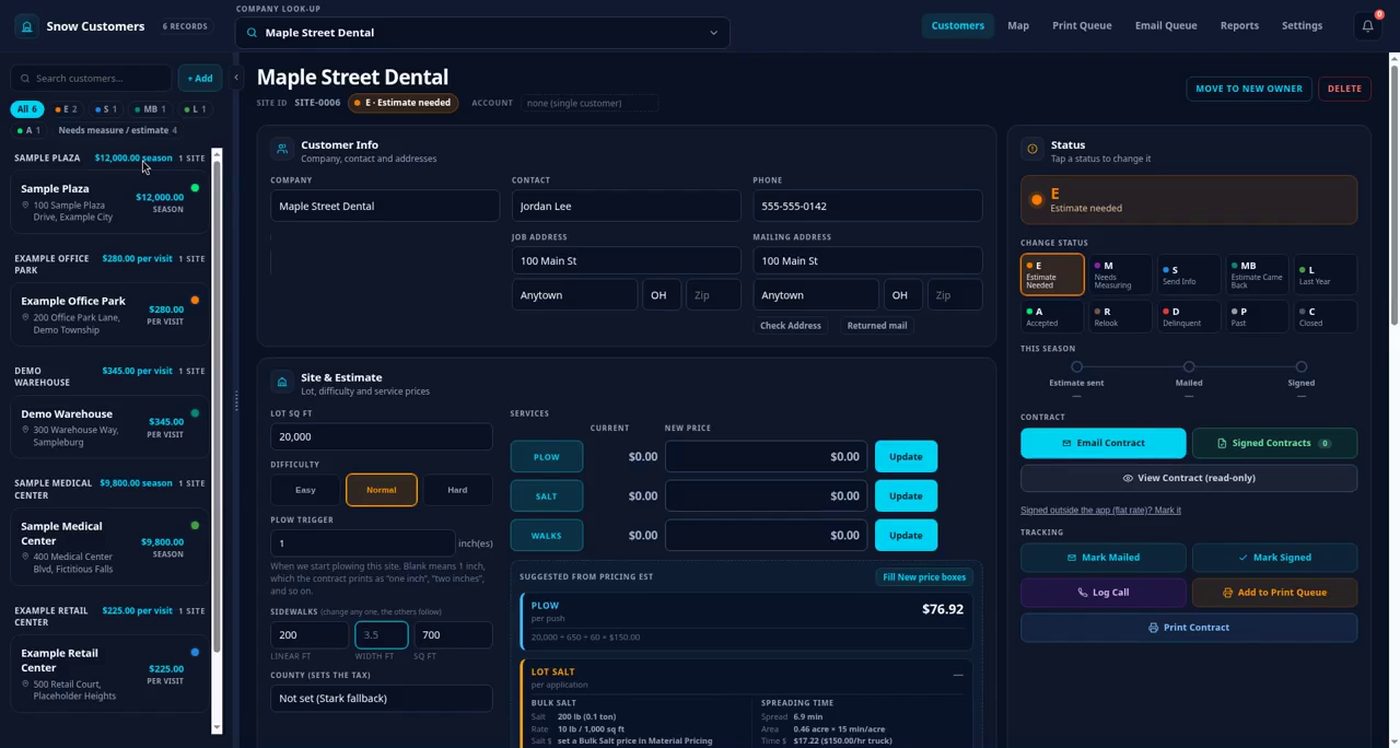
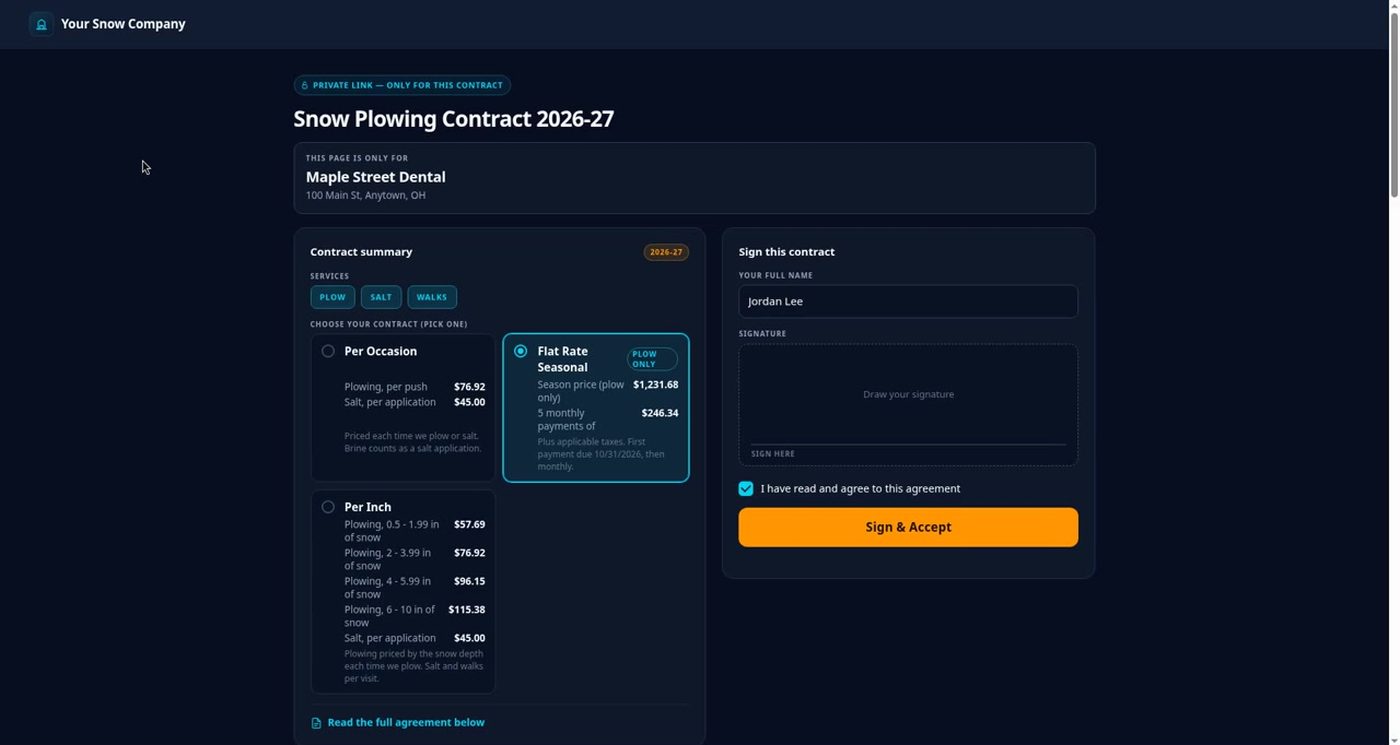
I’m Ed Gintling, and I’ve plowed in Clinton, Ohio since 1990. I built Snowplow Estimator to make estimates easy. It is a Google Sheet with a simple web app on top of it. You make your own copy, set it up with your company name, and use it to keep customers, build a seasonal estimate, send an agreement by email, and let customers sign on their phone.
Enter the lot size and Snowplow Estimator gives you the plow price and the season total, then you can send the agreement.
A silent, captioned walkthrough (5 minutes 41 seconds) of the Estimator, the emailed agreement, and signing on a phone. From the Snow Customers App YouTube channel — the channel name has not been changed yet.
Your customers and contracts stay in your own Google account. The seller does not host your customer list and cannot see it unless you choose to share a file or screen for support.
It is not a full field-service platform. It does not replace Jobber, Yardbook, or similar software. There is no crew mobile app, no GPS, no card payments, and no automatic invoicing through a payment processor.
You use your own free Google account. The app and your customer data live in that account, not on a company server.
Owner-operators and small snow crews who still run customers on paper, a spreadsheet, or an old Access file, and who want one place to go from estimate to a signed seasonal agreement.
HomeGuide’s December 17, 2025 guide, in the table “Rates for snow plowing parking lots,” lists about $150–$250 per plow visit for lots under 20,000 square feet, $200–$400 for lots of 20,000–60,000 square feet, and $400–$700+ for lots over 60,000 square feet. Housecall Pro’s Snow Removal Price Guide 2026 (updated October 27, 2026) lists parking-lot plowing at $75–$200 per event. For salt, HomeGuide’s 2026 Snow Removal Prices page lists about $2–$3 per 1,000 square feet on small jobs, or $150–$350 per acre. Housecall Pro lists salting parking lots and sidewalks at $95–$239 per application. These are national industry ranges from those published guides, not B-Sharp’s rates, and not a quote for any one job or company.
Sources: HomeGuide, How Much to Charge for Snow Removal (December 17, 2025); HomeGuide, 2026 Snow Removal Prices (salt); Housecall Pro, Snow Removal Price Guide 2026 (updated October 27, 2026). These figures are national industry ranges, not B-Sharp’s rates.
Snowplow Estimator does the math: enter the lot size and get the plow price and the season total. You adjust the suggested prices to your market, and the agreement goes out by email for the customer to sign on their phone.
$5 a month
Monthly, billed by Gumroad. Cancel any time from your Gumroad account. Includes the sheet, the setup guide, the tutorial video, updates, and email support while your membership is active.
Monthly — $5 a month$199 $99 one time Black Friday, through Dec 31
Lifetime, $199 one time, billed once by Gumroad. Includes the sheet, the setup guide, the tutorial video, updates for the life of the product, and email support while the product is still offered.
Black Friday Lifetime — $99If you start on the $5 monthly plan, the monthly payments you have already made count toward the $199. Email bsharppm@gmail.com to switch. Prices are billed by Gumroad. Tax may apply depending on your location. A license is for one business. You may not resell, share, or post the template, the guide, or the video. You can ask for a refund within 7 days of a charge at bsharppm@gmail.com.
Black Friday: use code BLACKFRIDAY (applied automatically by the Lifetime button) for $100 off Lifetime, $99 one time, through December 31, 2026 at 11:59 PM Pacific. After that, Lifetime is $199. A Lifetime purchase is one-time. Updates are included for the life of the product, and email support is included while the product is still offered. That means: as long as Ed continues to offer and update this app, a Lifetime buyer gets those updates and email support at no extra charge. It is not a promise that the app will be updated forever, or that Google will keep the underlying tools available.
The setup guide that comes with your purchase has pictures for the phone step. The first time you authorize the app, Google may show an “unverified app” warning. That is Google’s screen, not a charge or a sign-in for anyone else. Choose Advanced, then go to the app, if you want to continue. You should only approve it if you are comfortable with the permissions it lists. The setup guide explains this step.
There are two plans, billed by Gumroad. Monthly is $5 a month, and you can cancel any time from your Gumroad account. Lifetime is $199 one time. Tax may apply depending on your location.
Both include the sheet, the setup guide, and the tutorial video. Monthly includes updates and email support while your membership is active. If you cancel Monthly, you keep your own copy and your data; new updates and support stop. Lifetime includes updates for the life of the product, and email support while the product is still offered. That is not a promise that the app will be updated forever, or that Google will keep the underlying tools available.
Yes. The monthly payments you have already made count toward the $199. Email bsharppm@gmail.com to switch.
Yes. Snowplow Estimator is a snow plowing estimate calculator in Google Sheets, with a small web app on top of the same file. You make your own copy in your Google account. It is not an App Store or Google Play app, and it is not AppSheet.
Yes. After you set the prices, you can email the agreement with a link so the customer can sign on their phone.
Prices vary by market, lot layout, and the storm. Published guides put a commercial push around $150–$250 for a small lot, $200–$400 for a mid-size lot, and $400–$700+ for a large one, with salt usually extra. These are general industry ranges, not B-Sharp’s rates and not a quote for any one job or company. Snowplow Estimator does that math from your lot size: $5 a month or $199 lifetime. The published ranges and their sources are in the bidding section above.
A free Google account, a computer and a web browser, and a one-time Google setup (copy the sheet, approve Google’s permission screen, and deploy the web app). The guide and video walk through this. The app and your customer data live in your Google account, not on a company server.
Your own spreadsheet and data stay in your Google account. You can keep using the copy you already have. Access to new versions, the Gumroad download page, and email support ends.
No. It is not a full field-service platform. It does not replace Jobber, Yardbook, or similar software. There is no crew mobile app, no GPS, no card payments, and no automatic invoicing through a payment processor.
No. The agreement wording in the app is a starting template, not legal advice. Have a lawyer licensed where you work review it before you use it with customers.
You can ask for a refund within 7 days of the charge. Email bsharppm@gmail.com.
In your own Google account. The seller does not host your customer list and cannot see it unless you choose to share a file or screen for support.
Email bsharppm@gmail.com or call 330-882-1999.
Buy on Gumroad. Choose Monthly or Lifetime.
Months paid on Monthly count toward Lifetime. Support: bsharppm@gmail.com or call 330-882-1999.